> ## Documentation Index
> Fetch the complete documentation index at: https://flatfileinc-feat-updatereactquickstart.mintlify.site/llms.txt
> Use this file to discover all available pages before exploring further.
# Spaces
> The anatomy of Spaces.
Flatfile Spaces are micro-applications, each having their own database, filestore, and auth.
Use Spaces to integrate Flatfile into your data exchange workflow, whether that happens directly
in your application or as part of a currently offline process.
With Spaces, you can:
***
## Anatomy
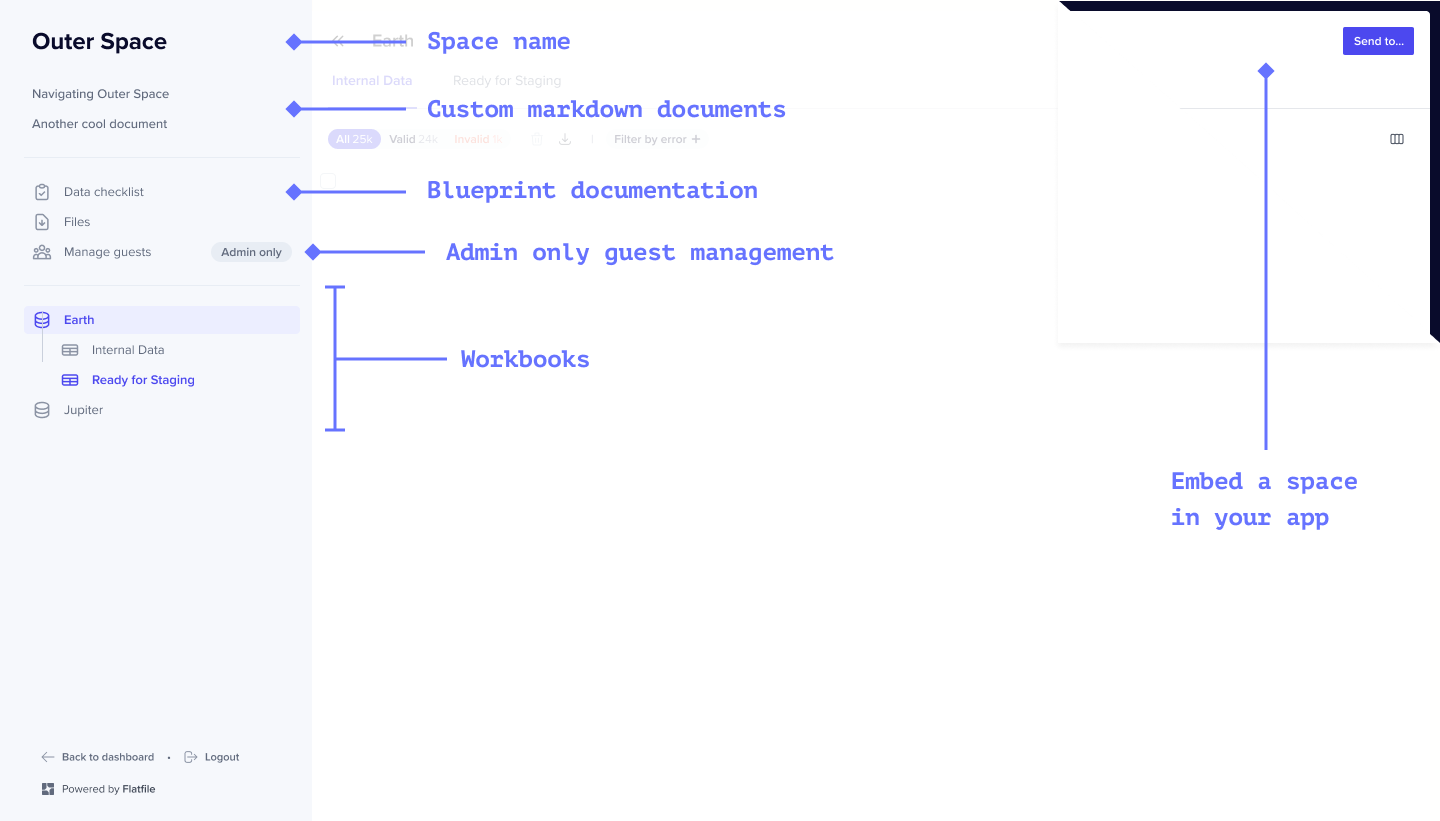
A Space is comprised of Workbooks, Files, Users, Documents, Themes and Metadata.
 ### Reference
[See API Reference](https://reference.flatfile.com/api-reference/spaces/create-a-space)
#### `Workbooks` *object*
A Space contains any number of Workbooks. Each [Workbook](../apps/workbooks) is a Blueprint-defined database.
Add the label 'pinned' to your workbook to ensure it appears as the first
workbook in the sidebar.
#### `Files` *object*
Files are uploaded directly to a Space.
#### `Users` *object*
By default, all global Admins in Flatfile have access to all Spaces. Additionally, you can configure a Space to allow for either temporary (`shared_link`) or named (`magic_link`) Guest Users.
#### `Documents` *object*
Documents are custom pages that are mounted on the Space and display in the sidebar of a Space in the order of their addition to the Space.
#### `Theme` *object*
Theming of Flatfile is controlled at the Space level. A comprehensive list of Theme options are available [here](../guides/theming).
#### `Metadata` *object*
Spaces can be created and updated with Metadata. This could include a company-specific identifier such as a UUID for use in API operations in the Space.
### Reference
[See API Reference](https://reference.flatfile.com/api-reference/spaces/create-a-space)
#### `Workbooks` *object*
A Space contains any number of Workbooks. Each [Workbook](../apps/workbooks) is a Blueprint-defined database.
Add the label 'pinned' to your workbook to ensure it appears as the first
workbook in the sidebar.
#### `Files` *object*
Files are uploaded directly to a Space.
#### `Users` *object*
By default, all global Admins in Flatfile have access to all Spaces. Additionally, you can configure a Space to allow for either temporary (`shared_link`) or named (`magic_link`) Guest Users.
#### `Documents` *object*
Documents are custom pages that are mounted on the Space and display in the sidebar of a Space in the order of their addition to the Space.
#### `Theme` *object*
Theming of Flatfile is controlled at the Space level. A comprehensive list of Theme options are available [here](../guides/theming).
#### `Metadata` *object*
Spaces can be created and updated with Metadata. This could include a company-specific identifier such as a UUID for use in API operations in the Space.