> ## Documentation Index
> Fetch the complete documentation index at: https://flatfileinc-feat-updatereactquickstart.mintlify.site/llms.txt
> Use this file to discover all available pages before exploring further.
# Handling data
> Learn how to process data with Data Hooks
**Data Hooks®** are concise functions that automatically **re-format**, **correct**, **validate**, and **enrich** data during the data import process. These hooks can be executed on a complete record, or row, of data using methods on the `FlatfileRecord` class.
Record-level hooks have access to all fields in a row and should be utilized for operations that require access to multiple fields or when creating a new field.
## Getting started
The `FlatfileRecord` class provides methods to manipulate and interact with a record in the Flatfile format, including setting values, retrieving values, adding information messages, performing computations, validating fields, and converting the record to JSON format.
Listen for updates to data records, and respond with three types of record hooks: `compute`, `computeIfPresent`, and `validate`. These hooks are available as methods on the `FlatfileRecord` class.
```js recordHook
import { recordHook, FlatfileRecord } from "@flatfile/plugin-record-hook";
```
```js bulkRecordHook
import { bulkRecordHook, FlatfileRecord } from "@flatfile/plugin-record-hook";
```
In these examples, we'll reference the Workbook from the [Quickstart
guide](/apps/custom/meet-the-workbook#building-your-first-workbook).
## Record Hooks
### `FlatfileRecord.compute`
Computes a new value for a field based on its original value or other field values on the record. Optionally pass an [info message](#flatfilerecord-addinfo) to surface to the user about the transformation. `compute` will run even when no value is set for the field (see [`computeIfPresent`](#flatfilerecord-computeifpresent)).
### Syntax
```js
FlatfileRecord.compute(fieldName, transformation, message);
```
The name of the field to transform.
The transformation to perform on the field value. Receives the initial value
of the field, as well as the entire record if you want to access other field
values on the record.
(optional) a message to show on the cell after the transformation.
### Example
Generate email from first and last name:
```js javascript recordHook()
listener.use(
recordHook("contacts", (record) => {
record.compute(
"email",
(email, record) =>
`${record.get("firstName")}${record.get("lastName")}@gmail.com`,
"Email was generated from first and last name."
);
return record;
})
);
```
```js typescript recordHook()
listener.use(
recordHook("contacts", (record: FlatfileRecord) => {
record.compute(
"email",
(email, record) => {
return `${record.get("firstName")}${record.get("lastName")}@gmail.com`;
},
// optional
"Email was generated from first and last name."
);
return record;
})
);
```
```js javascript bulkRecordHook()
listener.use(
bulkRecordHook("contacts", (records) => {
records.map((record) => {
record.compute(
"email",
(email, record) =>
`${record.get("firstName")}${record.get("lastName")}@gmail.com`,
"Email was generated from first and last name."
);
return record;
});
})
);
```
```js typescript bulkRecordHook()
listener.use(
bulkRecordHook("contacts", (records: FlatfileRecord[]) => {
records.map((record: FlatfileRecord) => {
record.compute(
"email",
(email, record) => {
return `${record.get("firstName")}${record.get(
"lastName"
)}@gmail.com`;
},
// optional
"Email was generated from first and last name."
);
return record;
});
})
);
```
### `FlatfileRecord.computeIfPresent`
Same as [`compute`](#flatfilerecord-compute), but only computes a new value if an initial value is provided (not null). Useful for computations that may throw an error on null values.
#### Syntax
```js
FlatfileRecord.computeIfPresent(fieldName, transformation, message);
```
The name of the field to transform.
The transformation to perform on the field value. Receives the initial value
of the field, as well as the entire record if you want to access other field
values on the record.
(optional) a message to show on the cell after the transformation.
#### Example
Change email to lower case:
```js javascript recordHook()
listener.use(
recordHook("contacts", (record) => {
record.computeIfPresent(
"email",
(email) => email.toLowerCase(),
// optional
"Email was converted to lowercase."
);
return record;
})
);
```
```js typescript recordHook()
listener.use(
recordHook("contacts", (record: FlatfileRecord) => {
record.computeIfPresent(
"email",
(email: string) => email.toLowerCase(),
// optional
"Email was converted to lowercase."
);
return record;
})
);
```
```js javascript bulkRecordHook()
listener.use(
bulkRecordHook("contacts", (records) => {
records.map((record) => {
record.computeIfPresent(
"email",
(email) => email.toLowerCase(),
// optional
"Email was converted to lowercase."
);
return record;
});
})
);
```
```js typescript bulkRecordHook()
listener.use(
bulkRecordHook("contacts", (records: FlatfileRecord[]) => {
records.map((record: FlatfileRecord) => {
record.computeIfPresent(
"email",
(email: string) => email.toLowerCase(),
// optional
"Email was converted to lowercase."
);
return record;
});
})
);
```
### `FlatfileRecord.validate`
Sets a field as invalid if its value does not meet a specified condition, and displays an [error message](#flatfilerecord-adderror) to the user.
#### Syntax
```js
validate(fieldName, validator, message);
```
The name of the field to validate.
A function that determines whether a given field value is valid. Receives the
intial value of the field, as well as the entire record if you want to access
other field values on the record.
A message to show on the cell if the field is invalid.
#### Example
```js javascript recordHook()
listener.use(
recordHook("contacts", (record) => {
record.validate(
"lastName",
(value) => !/\d/.test(value.toString()),
"Last name cannot contain numbers"
);
return record;
})
);
```
```js typescript recordHook()
listener.use(
recordHook("contacts", (record: FlatfileRecord) => {
record.validate(
"lastName",
(value) => typeof value === "string" && !/\d/.test(value),
"Last name cannot contain numbers"
);
return record;
})
);
```
```js javascript bulkRecordHook()
listener.use(
bulkRecordHook("contacts", (records) => {
records.map((record) => {
record.validate(
"lastName",
(value) => !/\d/.test(value.toString()),
"Last name cannot contain numbers"
);
return record;
});
})
);
```
```js typescript bulkRecordHook()
listener.use(
recordHook("contacts", (records: FlatfileRecord[]) => {
records.map((record: FlatfileRecord) => {
record.validate(
"lastName",
(value) => typeof value === "string" && !/\d/.test(value),
"Last name cannot contain numbers"
);
return record;
});
})
);
```
## Messages
Attach comments, errors, and warnings to specific fields in each record. These messages provide contextual information or alerts to users who interact with the record, helping them understand any issues or actions required.
### `FlatfileRecord.addInfo()`
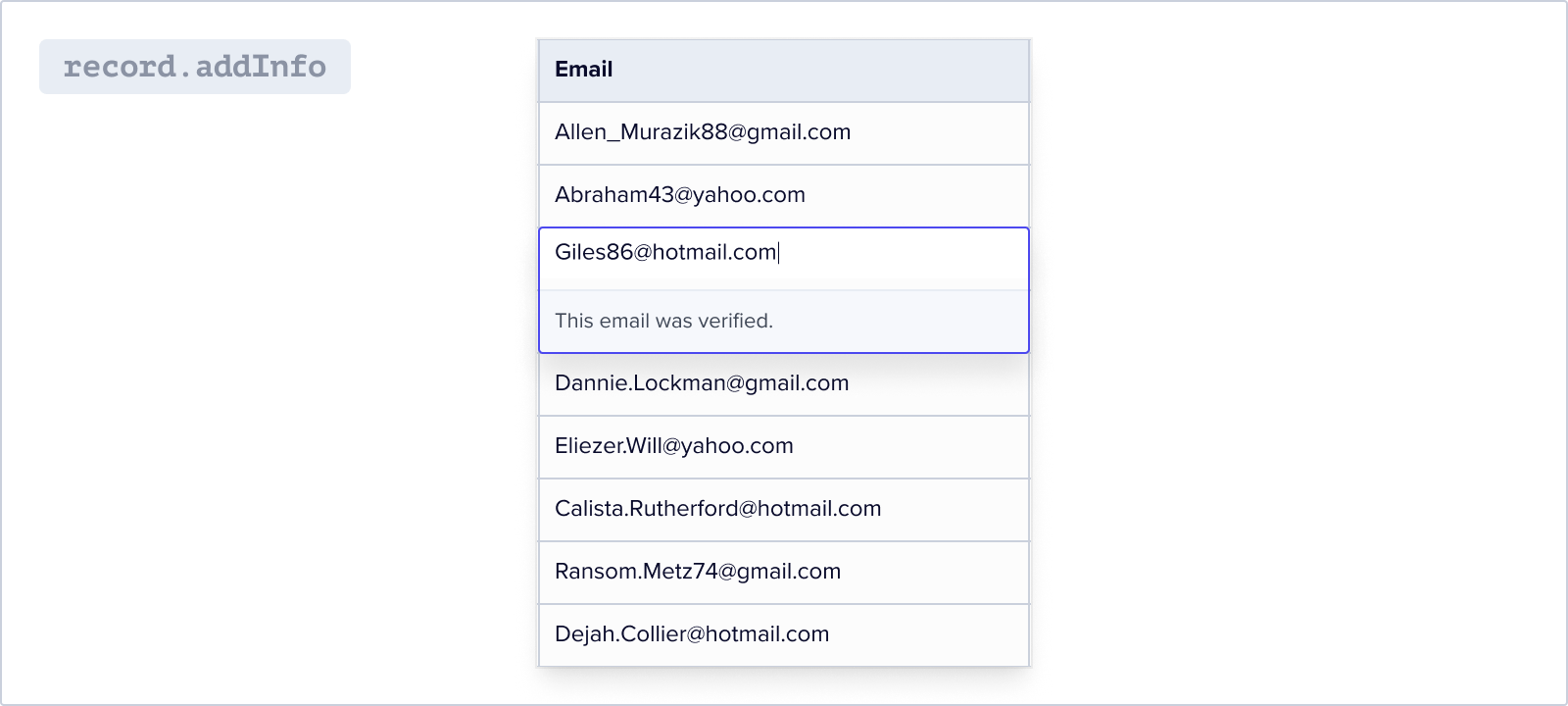
This method adds an information message to one or more fields in the record.
#### Syntax
```jsx
addInfo(fields, message);
```
Can be either a string representing a single field or an array of strings
representing multiple fields
The content of the message
#### Example
```jsx
const email = record.get("email");
const validEmailAddress = /^[^\s@]+@[^\s@]+.[^\s@]+$/;
if (email !== null && validEmailAddress.test(email)) {
record.addInfo("email", "This email was verified.");
}
```
### `FlatfileRecord.addError()`
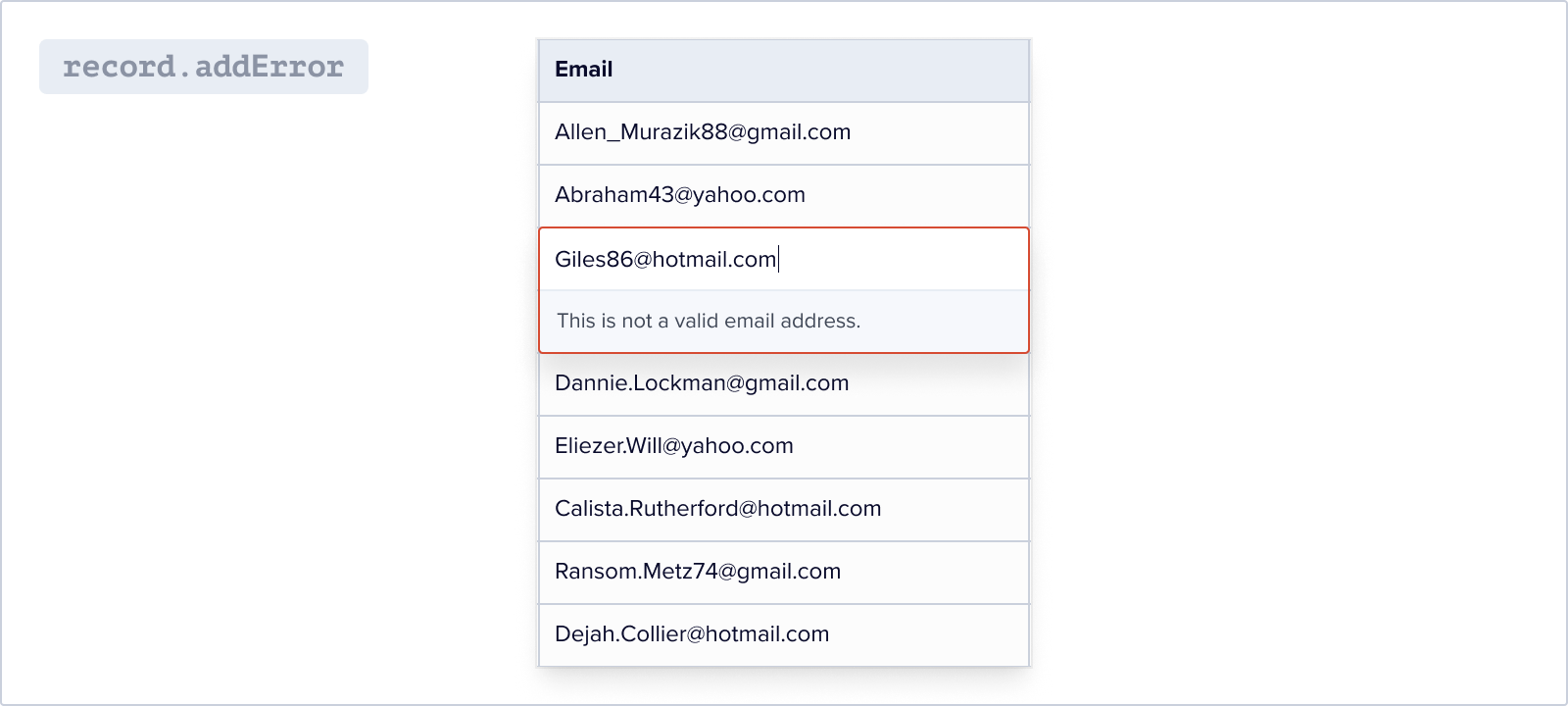
This method adds an error message to one or more fields in the record.
#### Syntax
```jsx
addError(fields, message);
```
Can be either a string representing a single field or an array of strings
representing multiple fields
The content of the message
#### Example
```jsx const email = record.get("email"); const validEmailAddress = /^[^\s@]+@[^\s@]+.[^\s@]+$/;
if (email !== null && !validEmailAddress.test(email)) {
record.addError("email", "This is not a valid email address.");
}
```
### `FlatfileRecord.addWarning()`
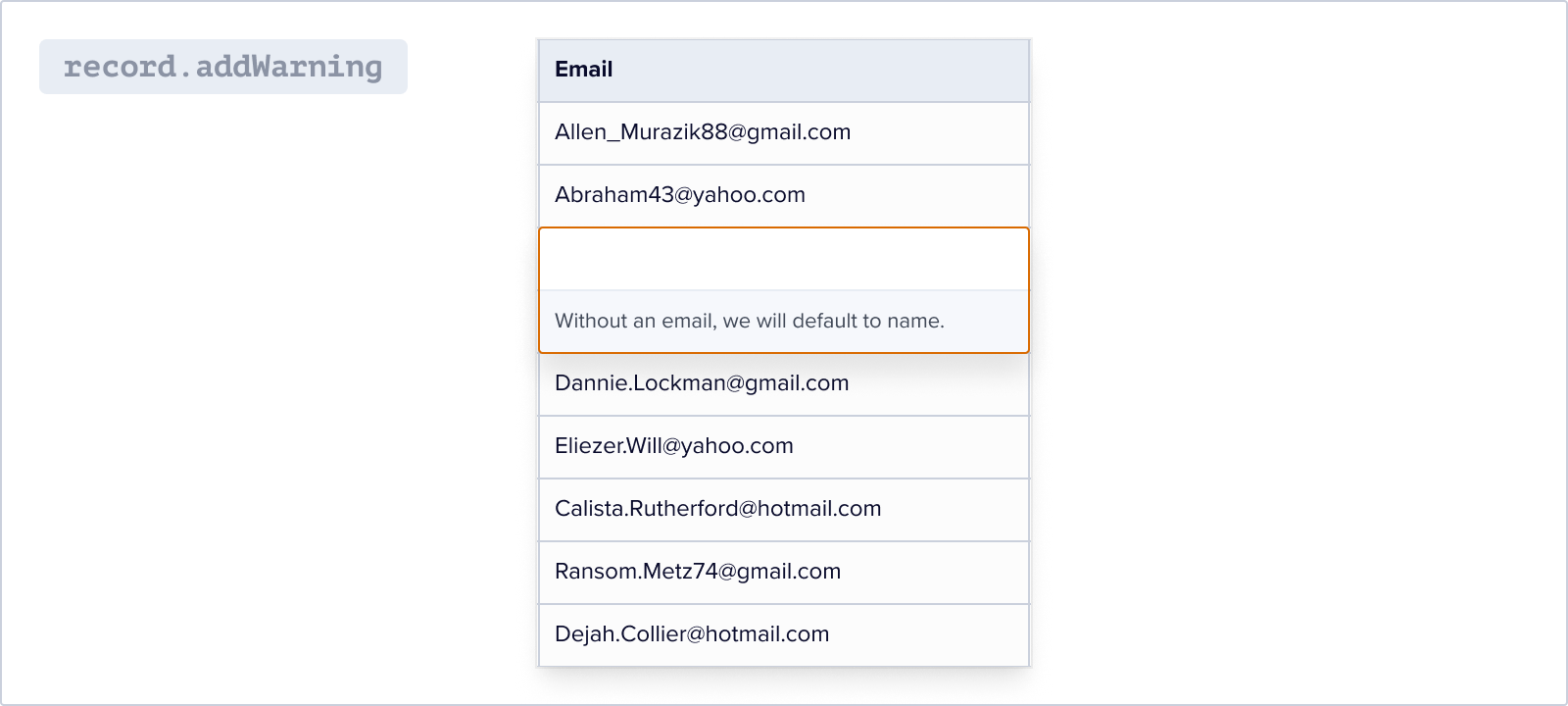
This method adds a warning message to one or more fields in the record.
#### Syntax
```jsx
FlatfileRecord.addWarning(fields, message);
```
Can be either a string representing a single field or an array of strings
representing multiple fields
The content of the message
#### Example
```jsx const email = record.get("email");
if (email === null) {
record.addWarning(
"email",
"Without an email, we will default to name for unique id."
);
}
```
## Accessing an API
Accessing an API within a `recordHook` or a `bulkRecordHook` allows for retrieving additional data or performing external operations to enrich or modify existing data. This approach integrates external data sources or services into the data manipulation workflow, enabling real-time or dynamic information to enhance the data. It is particularly useful when fetching related data, validating information, performing calculations, or any operation that relies on external input before modifying the data.
### Using `GET`
When a record is created or updated, you may need to fetch data from an API. Using a `GET` method does just that, then updates the record object with the retrieved data, and handles any errors that may occur during the process.
#### Example
In this example, an API call is made to retrieve beer data, which is then used to update the record object by setting the "assignedBeer" field with a random name from the beer data.
If an error occurs, we update the `status` field to "Failed" and add an error message. The modified record is then returned from the `recordHook`.
```js javascript recordHook()
listener.use(
recordHook("contacts", async (record, event) => {
try {
const { payload } = event.payload;
const getResponse = await axios.get(
"https://api.sampleapis.com/beers/ale"
);
record.set(
"assignedBeer",
getResponse.data[Math.floor(Math.random() * 20)].name
);
record.addInfo("assignedBeer", "Got this from " + getResponse.config.url);
} catch (error) {
record.set("status", "Failed");
record.addError(
"status",
"Couldn't get assigned beer data from the api."
);
} finally {
// Clean up or perform any necessary actions after the try/catch block
}
return record;
})
);
```
```jsx typescript recordHook()
listener.use(
recordHook(
"contacts",
async (record: FlatfileRecord, event: FlatfileEvent) => {
try {
const { payload } = event.payload;
const getResponse = await axios.get(
"https://api.sampleapis.com/beers/ale"
);
record.set(
"assignedBeer",
getResponse.data[Math.floor(Math.random() * 20)].name
);
record.addInfo(
"assignedBeer",
"Got this from " + getResponse.config.url
);
} catch (error) {
record.set("status", "Failed");
record.addError(
"status",
"Couldn't get assigned beer data from the api."
);
} finally {
// Clean up or perform any necessary actions after the try/catch block
}
return record;
}
)
);
```
```js javascript bulkRecordHook()
listener.use(
bulkRecordHook("contacts", async (records, event) => {
await Promise.all(
records.map(async (record) => {
try {
const { payload } = event.payload;
const getResponse = await axios.get(
"https://api.sampleapis.com/beers/ale"
);
record.set(
"assignedBeer",
getResponse.data[Math.floor(Math.random() * 20)].name
);
record.addInfo(
"assignedBeer",
"Got this from " + getResponse.config.url
);
} catch (error) {
record.set("status", "Failed");
record.addError(
"status",
"Couldn't get assigned beer data from the api."
);
} finally {
// Clean up or perform any necessary actions after the try/catch block
}
return record;
})
);
})
);
```
```jsx typescript bulkRecordHook()
listener.use(
bulkRecordHook(
"contacts",
async (records: FlatfileRecord[], event: FlatfileEvent) => {
await Promise.all(
records.map(async (record) => {
try {
const { payload } = event.payload;
const getResponse = await axios.get(
"https://api.sampleapis.com/beers/ale"
);
record.set(
"assignedBeer",
getResponse.data[Math.floor(Math.random() * 20)].name
);
record.addInfo(
"assignedBeer",
"Got this from " + getResponse.config.url
);
} catch (error) {
record.set("status", "Failed");
record.addError(
"status",
"Couldn't get assigned beer data from the api."
);
} finally {
// Clean up or perform any necessary actions after the try/catch block
}
return record;
})
);
}
)
);
```
### Using `POST`
When a record is created or updated, you may need to send data to an API. Sends the payload data from an Event to a webhook receiver URL using a `POST` request, then update the record object based on the success or failure of the request. Last, add messages to the fields accordingly.
#### Example
In this example, we are making a `POST` request to a webhook endpoint using axios. We pass the payload, method, and record as the request body and handle the response.
If the request is successful, we update the `status` field of the record to "Success" and add a comment. If an error occurs, we update the `status` field to "Failed" and add an error message. The modified record is then returned from the `recordHook`.
```jsx javascript recordHook()
listener.use(
recordHook("contacts", async (record, event) => {
try {
const { payload } = event.payload;
const webhookReceiver =
process.env.WEBHOOK_SITE_URL ||
"https://webhook.site/c83648d4-bf0c-4bb1-acb7-9c170dad4388";
const postResponse = await axios.post(
webhookReceiver,
{
...payload,
method: "axios",
record,
},
{
headers: {
"Content-Type": "application/json",
},
}
);
record.set("status", "Success");
record.addInfo(
"status",
"Record data sent to " + postResponse.config.url
);
} catch (error) {
record.set("status", "Failed");
record.addError("status", "Couldn't send record to the destination.");
} finally {
// Clean up or perform any necessary actions after the try/catch block
}
return record;
})
);
```
```jsx typescript recordHook()
listener.use(
recordHook(
"contacts",
async (record: FlatfileRecord, event: FlatfileEvent) => {
try {
const { payload } = event.payload;
const webhookReceiver =
process.env.WEBHOOK_SITE_URL ||
"https://webhook.site/c83648d4-bf0c-4bb1-acb7-9c170dad4388";
const postResponse = await axios.post(
webhookReceiver,
{
...payload,
method: "axios",
record,
},
{
headers: {
"Content-Type": "application/json",
},
}
);
record.set("status", "Success");
record.addInfo(
"status",
"Record data sent to " + postResponse.config.url
);
} catch (error) {
record.set("status", "Failed");
record.addError("status", "Couldn't send record to the destination.");
} finally {
// Clean up or perform any necessary actions after the try/catch block
}
return record;
}
)
);
```
```jsx javascript bulkRecordHook()
listener.use(
bulkRecordHook("contacts", async (records, event) => {
const webhookReceiver =
process.env.WEBHOOK_SITE_URL ||
"https://webhook.site/c83648d4-bf0c-4bb1-acb7-9c170dad4388";
const { payload } = event.payload;
for (const record of records) {
try {
const postResponse = await axios.post(
webhookReceiver,
{
...payload,
method: "axios",
record,
},
{
headers: {
"Content-Type": "application/json",
},
}
);
record.set("status", "Success");
record.addInfo(
"status",
"Record data sent to " + postResponse.config.url
);
} catch (error) {
record.set("status", "Failed");
record.addError("status", "Couldn't send record to the destination.");
} finally {
// Clean up or perform any necessary actions after the try/catch block
}
}
})
);
```
```jsx typescript bulkRecordHook()
listener.use(
bulkRecordHook(
"contacts",
async (records: FlatfileRecord[], event: FlatfileEvent) => {
const webhookReceiver =
process.env.WEBHOOK_SITE_URL ||
"https://webhook.site/c83648d4-bf0c-4bb1-acb7-9c170dad4388";
const { payload } = event.payload;
for (const record of records) {
try {
const postResponse = await axios.post(
webhookReceiver,
{
...payload,
method: "axios",
record,
},
{
headers: {
"Content-Type": "application/json",
},
}
);
record.set("status", "Success");
record.addInfo(
"status",
"Record data sent to " + postResponse.config.url
);
} catch (error) {
record.set("status", "Failed");
record.addError("status", "Couldn't send record to the destination.");
} finally {
// Clean up or perform any necessary actions after the try/catch block
}
}
}
)
);
```
## getLinks
The `getLinks` method is a feature of the FlatfileRecord class. When a field in your record is of the Reference Field type and links to another record, getLinks can fetch those linked fields for you.
### Usage
When processing a record, you may find references to a related record. To retrieve the fields from the related record, use the `getLinks` method. Provide the field key of the Reference Field type, the part of the record that holds the reference to the other records, like this:
```javascript
const relatedRecords = record.getLinks("referenceFieldKey");
```
The getLinks method will then return an array containing all fields from the linked record associated with the provided 'referenceFieldKey'. If there is not a linked record associated with this field, an empty array will be returned.
### Benefits
Using `getLinks` provides access to all related information. It's particularly useful when you want to perform operations similar to VLOOKUPs in spreadsheets, or when you need to compare data across referenced fields.
For instance, you could use `getLinks` to fetch all the fields related to a particular record and enrich your data, or compare the related records for validation.
With `getLinks`, processing related datasets becomes much more manageable in Flatfile. This method provides you with an effective way to navigate, enrich, and validate your data.
## Deleting records
There are primarily two use cases for deleting records:
1. Deleting a subset of records
2. Deleting all records in a sheet
### Deleting a subset of records
To delete a subset of records first import the `@flatfile/api` package, then use the `api.records.delete()` helper method. This method takes in an array of record IDs and deletes them from the sheet.
Example:
```javascript
await api.records.delete(sheetId, { ids: [...] });
```
### Deleting all records in a sheet
For clearing an entire sheet of its records, set up a bulk delete job. This task will comprehensively wipe out every record on the specified sheet. Check out our [jobs documentation](/orchestration/jobs).
Example:
```javascript
await api.jobs.create({
type: "workbook",
operation: "delete-records",
trigger: "immediate",
source: workbookId,
config: {
sheet: sheetId,
filter: "all",
},
});
```
Clone the Handling Data example in Typescript
Clone the Handling Data example in Javascript