> ## Documentation Index
> Fetch the complete documentation index at: https://flatfileinc-feat-updatereactquickstart.mintlify.site/llms.txt
> Use this file to discover all available pages before exploring further.
# @flatfile/util-response-rejection
> A shared utility for handling response rejections.
The `@flatfile/util-response-rejection` utility is built to handle response rejections
from an external source. It is designed to be used as a rejection response handler
in an egress listener.
## Usage
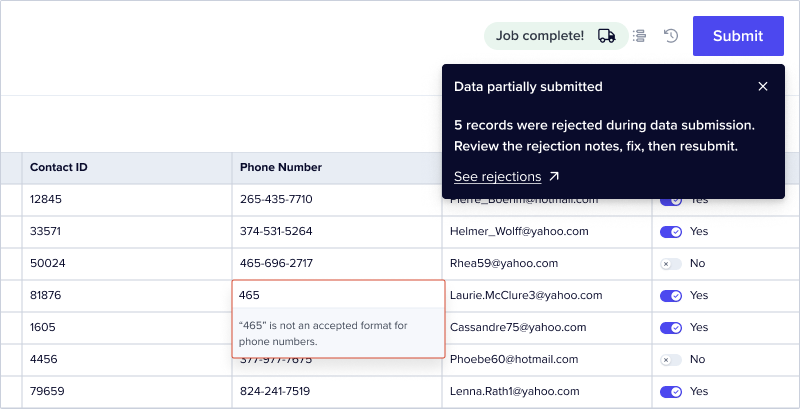
The purpose of `@flatfile/util-response-rejection` utility is to handle cases where some Records
were rejected during an egress process. The `responseRejectionHandler` function is designed to
consume a set of sheets containing rejected Records, and then process the rejected Records by
marking the offending Record fields with the returned rejection message indicating why they were
rejected. If the response value of `deleteSubmitted` is `true`, the successfully submitted values
will be deleted from the Sheet. If `deleteSubmitted` is false or not provided, a `Submission Status`
field is added to the Sheet and each Record is set to either "Submitted" or "Rejected". In the end,
it returns a `JobCompleteDetails` object which can be used to complete the the Flatfile Job.
```bash install
npm i @flatfile/util-response-rejection @flatfile/api @flatfile/listener
```
### **Response Rejection Handler Function**
* The `responseRejectionHandler` function is the main entry point of the utility. It takes one parameter:
* `responseRejection`: An object containing the rejection data. This object's structure is defined by the `RejectionResponse` interface.
* The `responseRejectionHandler` function returns a `Promise` that resolves to a `number` representing the total number of rejected Records across all sheets.
```ts
import type { Flatfile } from "@flatfile/api";
import api from "@flatfile/api";
import type { FlatfileEvent, FlatfileListener } from "@flatfile/listener";
import type { RejectionResponse } from "@flatfile/util-response-rejection";
import { responseRejectionHandler } from "@flatfile/util-response-rejection";
export default function (listener: FlatfileListener) {
listener.on(
"job:ready",
{ job: "workbook:submitActionFg" },
async (event: FlatfileEvent) => {
const { jobId } = event.context;
await api.jobs.ack(jobId, {
info: "Accepted",
progress: 1,
});
// Default outcome for successful submission
let outcome: Flatfile.JobCompleteDetails = {
outcome: {
message: `Data was successfully submitted with no rejections.`,
},
};
try {
const data = []; // TODO: implement your own logic here for retrieving the records and formatting them for the webhook
const response = await fetch("https://webhook.site/...", {
method: "POST",
headers: {
"Content-Type": "application/json",
},
body: JSON.stringify(data),
});
if (!response.ok) {
throw new Error(`HTTP error! status: ${response.status}`);
}
const responseData = await response.json();
const rejections: RejectionResponse = responseData.rejections;
if (rejections) {
// Update outcome for rejections
outcome = await responseRejectionHandler(rejections);
}
await api.jobs.complete(
jobId,
outcome ?? {
outcome: {
message: "Job complete",
},
}
);
} catch (error) {
await api.jobs.fail(
jobId,
outcome ?? {
info: String(error.message),
outcome: {
acknowledge: true,
message: String(error.message),
},
}
);
}
}
);
}
```
### **RejectionResponse Interface**
The `RejectionResponse` interface defines the structure of the `responseRejection` parameter object that is passed into the `responseRejectionHandler` function. This `RejectionResponse`'s structure is as follows:
```ts
{ // RejectionResponse interface
id: string; // The Workbook ID
message: "Success! All records are valid.", // Optional
deleteSubmitted: true, // Optional, default `false`
sheets: [
{ // SheetRejections interface
sheetId: string; // The Sheet ID
rejectedRecords: [
{ // RecordRejections interface
id: string; // The Record ID
values: [
{
field: string; // The field key
message: string; // The rejection reason
}
];
}
// other rejected records...
];
}
// other sheets...
];
}
```
The `message` property is optional. If provided, this message will be displayed to the user. This message should be set for either a successful submission or a rejection submission.
The `deleteSubmitted` property is optional. If true, the successfully submitted values will be deleted from the Sheet. If false or not provided, a `Submission Status` field is added to the Sheet and each Record is set to either "Submitted" or "Rejected".
### **Helper Functions**
* The code includes a helper functions to assist in the Flatfile Sheet update process:
* `updateSheet`: Updates a Flatfile Sheet by adding the returned rejection messages as error messages on the Records.
### **Type Definitions**
* The code defines three interfaces: `RejectionResponse`, `SheetRejections` and `RecordRejections`. These interfaces represent the structure expected by the `responseRejectionHandler()`.
## See the code